Locals Beacon
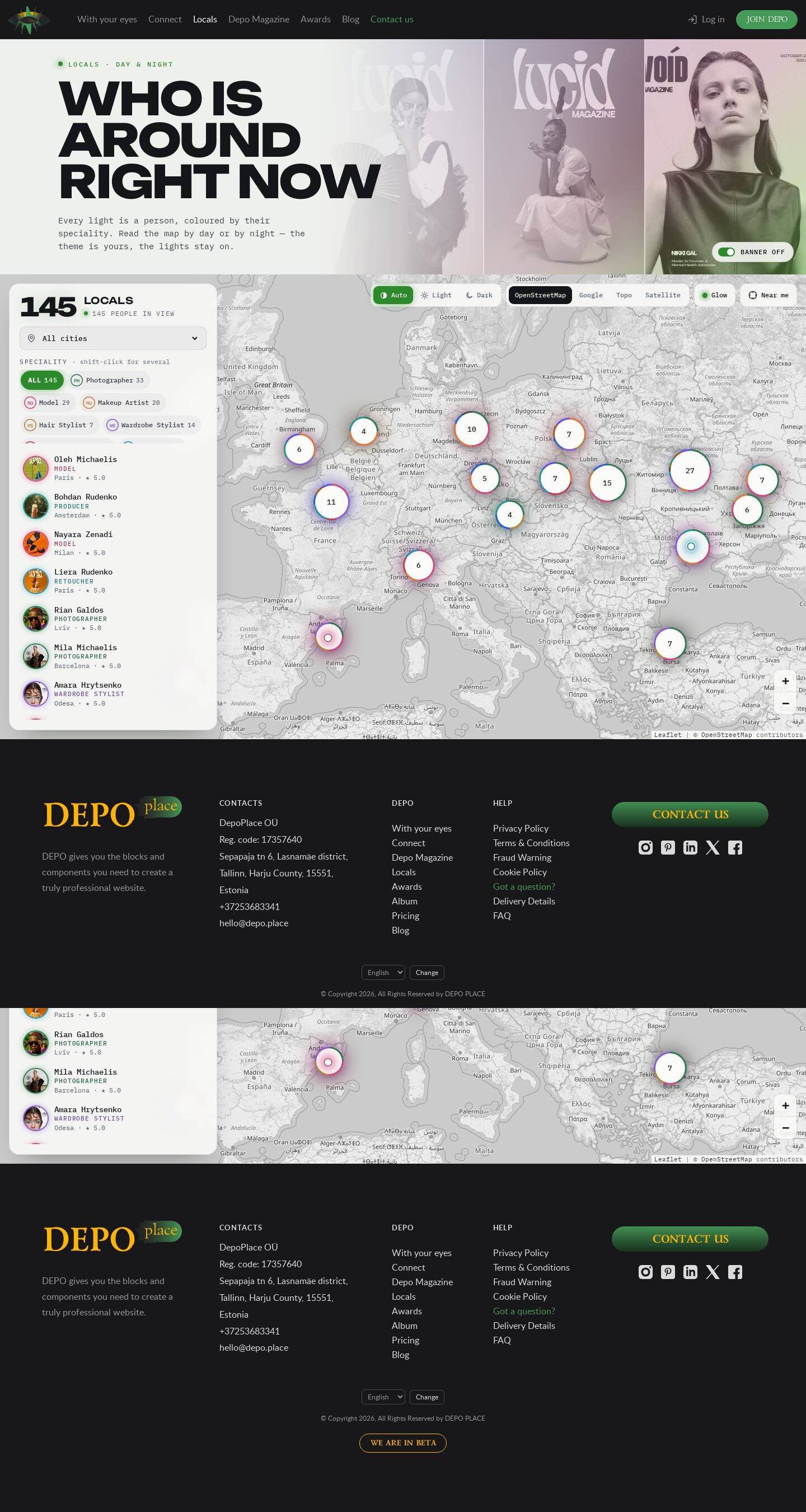
Locals by day or by night: demo27's glowing speciality lights and glow layer, demo25's side panel with chips, people in view and the card, and a light and a dark theme for every base map — OpenStreetMap, Google, Topo, Satellite. Remembered; follows the system theme until you choose.
Summary
The two best parts of the map demos in one page, readable in daylight and at night. The map and its people come from demo27: every person a small white light ringed and glowing in the colour of their speciality (bigger for higher ratings), over a blurred glow layer that shows where each speciality gathers. The panel on the left comes from demo25: a big count of people in view, the city picker, the specialities as chips with live counts, the people in view, and a person's card opening over the list. New here: every base map has a light and a night version, switched by Auto / Light / Dark on the map. The choice is remembered; "Auto" (the default) follows the system theme and changes with it live. The banner, panel, card, controls and the glow change with the map: the glow layer blends with screen on the night map and with multiply on the light one, so the lights read on both.
Prompt
The brief this page was built from.
Build one page of the DEPO demo album: the DEPO "Locals" page (https://dev0.dphub.net/locals —
people near you, filtered by speciality) as a map, made from two existing map demos of the album.

Function (the shared locals map engine on Leaflet 1.9.4, vanilla JS, as in demo25–demo28):
- The real DEPO site header and footer; the page banner under the header, switchable (a button
  on it, a "banner on" button on the map, ?banner=0 / ?banner=1, remembered); the map starts right
  under the banner and fills the rest of the screen.
- The 14 DEPO specialities as the filter, with counts of each in the current view; clusters with
  a ring split by speciality; shift-click keeps several; filter and base map kept in the URL.
- People in view, best rated first, and a card for the chosen person; city picker and "near me";
  160 realistic locals in 20 cities.
- Base maps without API keys only (OpenStreetMap, OpenTopoMap, Google tile servers); CARTO needs
  a key and is not used.

Take from demo27 ("Locals Radar"): the map look — every person a small light ringed and glowing in
their speciality colour, sized by rating, over a blurred glow layer that can be switched off; the
big glowing counter; the pulsing ring around the chosen person; the cinematic banner with a huge
two-line Unbounded title over duotone portraits; Unbounded + IBM Plex Mono and one signal green.

Take from demo25 ("Locals Atlas"): the side panel on the left — the count, the city picker, the
specialities as chips with a code badge and a count, the list of people in view, and the card
opening inside the panel over the list; on phones the panel moves under the map and the card
becomes a bottom sheet.

New: a light and a dark theme for every map. Each base map (OpenStreetMap, Google, Topo,
Satellite) has a light and a night version made by re-colouring the same tiles with a CSS filter.
A switch Auto / Light / Dark on the map picks the version and themes the whole page around it
(banner, panel, card, controls, glow). The choice is remembered; by default it follows the system
theme (prefers-color-scheme) and updates live when the system changes. Set the theme before the
first paint so there is no flash. The lights must read on both: on the light map give them a
white halo and blend the glow layer with multiply instead of screen.

360–1920 px without horizontal scroll, visible focus, reduced motion honoured.
How the map works
The map demos (demo25–demo28, demo31) share one engine, js/locals-map.js on Leaflet 1.9.4, the data file js/people.js and the structural stylesheet css/locals-map.css (each demo keeps its own copy). demo31's copy adds four tile keys — osm-topo-light, osm-topo-night, google-sat-light, google-sat-night — and two filters (sat-light, sat-night) to the engine's light / night set.
- Theme × map:
js/demo31.jskeeps two choices — the map (osm,google,topo,sat,localStorage depo-mapfamily-demo31) and the theme mode (auto,light,dark,localStorage depo-theme-demo31, or?theme=in the address) — and turns them into one tile key (osm-light,google-night…) for the engine. A shared?provider=link keeps its map; the theme stays the visitor's. - No flash: a small inline script in
<head>setshtml[data-theme]from the saved mode orprefers-color-schemebefore the CSS paints; "Auto" listens to the media query and switches live. - Everything else is the shared engine: banner on/off, speciality counts in view, clusters, list, card, city, "near me" (see the demo25 post).
Look
- Type: Unbounded 400–800 (banner title, counter, card name, buttons); IBM Plex Mono (all text and numbers).
- Palette: night — ground
#0a0b0d, glassrgba(14,15,18,.84), ink#eef0f4, dim#8d93a0, signal green#9dff6a; day — ground#eef0ec, glassrgba(250,251,249,.88), ink#14161a, dim#5d6470, signal green#2c8a2a; speciality colours fromjs/people.jsas light in both. - Layout: header · banner (duotone portraits on the right, the title on the left) · map stage: the 372 px panel on the left, the theme switch, base maps, Glow, "Near me" and "Banner on" top right, zoom bottom right · footer. On phones the tools wrap over the map with short map names, the panel follows the map, the card is a bottom sheet.
- Motion: pulsing "live" dots, lights grow on hover, a pulsing ring around the chosen person, colours cross-fade when the theme changes; all off with reduced motion.
Built with
| Part | What |
|---|---|
| HTML | public/demo31/index.html — the live DEPO header and footer, the banner (data-banner), the map stage (data-locals), the inline theme script |
| CSS | public/demo31/css/site.css, site-chrome.css, header.css — site copies; css/lib/leaflet-1.9.4.css; css/locals-map.css — engine structure; css/demo31.css — this demo's look, tokens per html[data-theme] |
| JS | public/demo31/js/locals-map.js — the map engine (shared copy, extra light / night tile keys); js/people.js — data; js/demo31.js — theme × map switch, starts the engine; js/header.js — the burger |
| Libraries | Leaflet 1.9.4 — public/demo31/js/lib/leaflet-1.9.4.js (https://leafletjs.com) |
| Fonts | Lato, Poppins, Lazurski self-hosted in public/demo31/fonts/ (site chrome); see Look for the page fonts |
| Images | /_img/photos/ (banner, cards), /_img/site/first-page/ (named people), public/demo31/img/avatars/ (160 px crops) |
Borrowed
- From this album: demo27 (the lights, glow layer, banner, card look) and demo25 (the side panel and its behaviour), and the shared engine, data and avatars of demo25–demo28.
- Leaflet 1.9.4 (BSD-2-Clause), the same file the site uses (
front/public/js/lib/leaflet-1.9.4.js,front/public/css/lib/leaflet-1.9.4.css). - The header and footer markup and the site CSS (
site.css,site-chrome.css,header.css, fonts, the burger fromsite.js) as copied for demo20. - Map tiles: © OpenStreetMap contributors, OpenTopoMap (CC-BY-SA), © Google — shown in the map's attribution.
Config
None — static page. The tiles come straight from tile.openstreetmap.org, tile.opentopomap.org and mt0–3.google.com in the visitor's browser.
Notes
- Google tiles are Google's public tile servers used without the Maps JavaScript API: fine for a design demo, but a production page needs the API with a key, or a licensed tile provider. OpenStreetMap's and OpenTopoMap's own tile servers are meant for light use only.
- The light and night versions are CSS filters over the same tiles, so the night maps are inverted colour maps rather than designed dark styles; a production page would use a styled vector map.
- The site header and footer stay dark in both themes: they are the real site chrome.
Suits a site for…
What kind of website would this design fit? Agree with a tag by clicking it, or add your own — a tag can be several words.
No tags yet — be the first.
Comments 0
No comments yet — be the first.